Crafting a user-friendly interface is paramount for any successful digital product. A well-designed UI not only enhances user satisfaction but also directly impacts conversion rates and overall engagement. This guide delves into nine key strategies to optimize your UI, focusing on understanding user needs, applying effective design principles, and implementing iterative improvements through testing and feedback. We’ll explore practical techniques and actionable steps to elevate your user experience to new heights.
From defining clear user personas and mapping their journeys to implementing accessibility best practices and A/B testing different designs, we will cover the entire process of UI optimization. We’ll examine the importance of visual hierarchy, layout choices, and consistent design guidelines, equipping you with the knowledge to create an intuitive and enjoyable user experience.
Understanding User Needs & Goals
Creating a truly effective UI requires a deep understanding of the users who will interact with it. Ignoring user needs and goals leads to frustration, low engagement, and ultimately, a failed product. By prioritizing user-centric design, we can build interfaces that are intuitive, enjoyable, and achieve their intended purpose. This section explores methods for understanding user needs and incorporating that knowledge into the design process.
Effective UI design starts with a clear picture of the user. This involves more than just demographics; it requires understanding their motivations, frustrations, and technological proficiency. By combining user research with careful consideration of their goals, we can craft a UI that is both effective and user-friendly.
User Persona Development
A user persona is a fictional representation of your ideal user. It’s more than just a demographic profile; it paints a picture of a specific individual, including their goals, motivations, frustrations, and technical skills. For example, consider an e-commerce website selling handmade jewelry. A user persona might be “Sarah,” a 35-year-old working professional with a passion for unique accessories. She’s comfortable using technology but values ease of navigation and high-quality product images. Sarah is looking for a specific style of necklace and wants a quick, secure checkout process. This detailed persona guides design decisions, ensuring the website caters to her specific needs and preferences. Developing several personas representing different user groups provides a broader understanding of your target audience.
User Journey Mapping
A user journey map visually illustrates the steps a user takes to achieve a specific goal within your UI. This map Artikels the user’s actions, emotions, and pain points at each stage of the process. For Sarah, her journey might start with a search for “handmade silver necklaces,” proceed through browsing product pages, adding items to a cart, and finally, completing the purchase. The journey map would highlight potential friction points, such as a confusing navigation structure or a complicated checkout process. Identifying these friction points allows designers to address them proactively, leading to a smoother and more satisfying user experience. For instance, a slow loading time on product pages could be identified as a pain point and addressed through optimization.
User Story Examples
User stories are short, simple descriptions of a user’s interaction with the UI, written from the user’s perspective. They follow a simple format: “As a [user type], I want [goal] so that [benefit].” Examples for Sarah’s interaction with the e-commerce website include: “As a customer, I want to easily search for specific items so that I can quickly find what I’m looking for,” and “As a customer, I want a secure checkout process so that my payment information is protected.” These stories guide the development of specific UI elements and functionalities, ensuring they meet user needs. Each story helps the development team understand the user’s motivation and the intended outcome.
Usability Testing
Usability testing involves observing real users interacting with the UI to identify areas for improvement. This can be done through various methods, such as moderated or unmoderated testing sessions, where participants are asked to complete specific tasks while their actions and verbal feedback are recorded. Observing users navigate the website allows designers to identify unexpected difficulties, such as confusing layouts or unclear instructions. For instance, usability testing might reveal that Sarah struggled to find the customer support section, highlighting a need for improved site navigation or a more prominent help icon. The data gathered informs design iterations, ensuring the UI is both functional and user-friendly. This iterative process of testing and refinement is crucial for creating a successful product.
Principles of Effective UI Design
Effective UI design hinges on understanding and applying core principles that enhance user experience and ensure seamless navigation. These principles go beyond mere aesthetics; they directly impact usability, accessibility, and ultimately, the success of any digital product or service. By carefully considering visual hierarchy, layout styles, accessibility guidelines, and consistent design elements, developers can create interfaces that are both intuitive and enjoyable to use.
Visual Hierarchy and User Navigation
Visual hierarchy dictates the order in which users perceive information on a screen. It guides their eyes and directs their attention to the most important elements first. This is achieved through careful use of size, color, contrast, and whitespace. For example, larger, bolder headings draw the eye more readily than smaller, less prominent text. Strategic use of color can highlight key actions or information, while ample whitespace creates visual breathing room and prevents the interface from feeling cluttered. A well-defined visual hierarchy significantly improves user navigation by making it easy to find what they need quickly and efficiently. Poor visual hierarchy, conversely, leads to confusion and frustration, as users struggle to locate important information or understand the flow of the interface.
Comparison of Layout Styles
Different layout styles suit various content types and user goals. Choosing the right layout is crucial for optimizing user experience. Grid layouts provide a structured and organized presentation of content, particularly effective for displaying a large number of items or complex information. List layouts are best for displaying a series of items in a linear fashion, such as a list of products or search results. Card layouts offer a visually appealing way to present individual pieces of information in a modular format, often used for showcasing products, articles, or other content blocks. The choice depends heavily on the nature of the content and the desired user interaction.
| Layout Style | Description | Suitable Content Types | Example Use Cases |
|---|---|---|---|
| Grid | Structured arrangement of elements in rows and columns. | Large datasets, galleries, product catalogs | E-commerce product listings, image galleries, dashboards |
| List | Linear presentation of items, often with bullet points or numbering. | Simple lists of items, search results, navigation menus | Navigation menus, to-do lists, search result pages |
| Card | Modular presentation of individual items with visual elements. | Products, articles, blog posts, news feeds | E-commerce product displays, news feeds, blog archives |
| Hybrid | Combination of multiple layouts. | Complex interfaces requiring diverse content presentation. | Social media feeds, dashboards with various data visualizations. |
Accessibility in UI Design
Designing for accessibility ensures that users with disabilities can access and use the interface effectively. This includes considerations for users with visual, auditory, motor, and cognitive impairments. Key principles include providing alternative text for images, using sufficient color contrast, ensuring keyboard navigation, offering captions and transcripts for videos and audio, and designing for users with cognitive disabilities through clear and concise language and logical information architecture. Following WCAG (Web Content Accessibility Guidelines) is essential for creating inclusive and accessible interfaces. Failure to adhere to accessibility guidelines not only limits usability for a significant portion of the population but can also lead to legal issues and reputational damage.
UI Guidelines: Typography, Color, and Spacing
Consistency in typography, color palettes, and spacing is paramount for creating a cohesive and professional user interface. A well-defined style guide should specify the fonts, font sizes, and weights used throughout the interface, ensuring readability and visual harmony. A limited color palette, strategically used to highlight key elements and maintain visual consistency, enhances user experience. Consistent spacing between elements, both horizontally and vertically, improves readability and creates a clean and uncluttered look. These guidelines should be meticulously documented and consistently applied across all aspects of the interface to ensure a unified and user-friendly experience. Consider using a design system to manage and enforce these guidelines.
Implementing UI Improvements & Testing
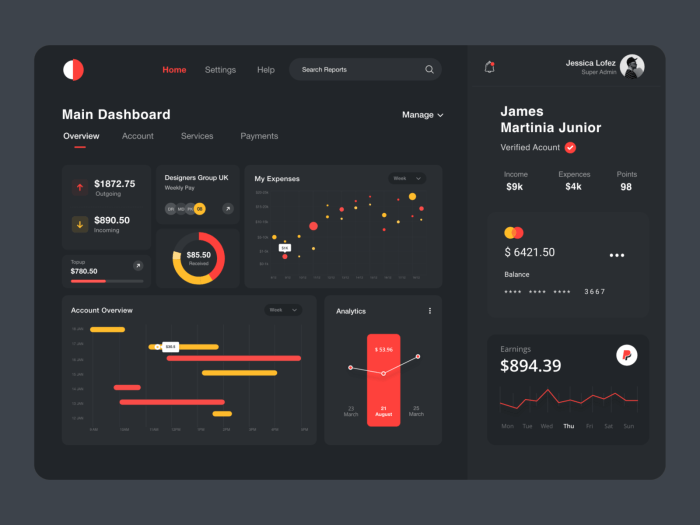
Improving a user interface isn’t just about aesthetics; it’s about making the user experience more efficient and enjoyable. This involves strategically enhancing existing elements and rigorously testing changes to ensure they achieve their intended impact. This section will explore practical methods for implementing UI improvements and using testing to validate those changes.
Effective UI improvement requires a combination of informed design choices and data-driven validation. By systematically addressing issues in navigation, forms, and buttons, and then measuring the impact of those changes through A/B testing, we can create a truly user-centered interface.
UI Element Enhancements
Specific UI elements often present opportunities for significant usability gains. Consider these examples of improvements:
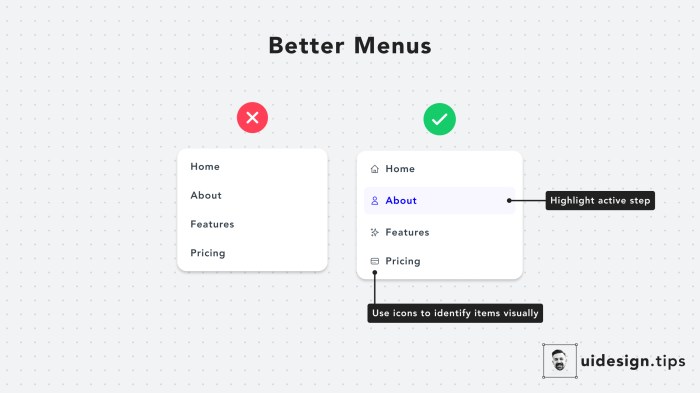
- Navigation Menus: Instead of a simple, linear menu, consider implementing a mega-menu for improved discoverability of sub-pages. A mega-menu visually organizes sub-pages into logical categories, reducing the number of clicks needed to find specific information. For example, an e-commerce site could use a mega-menu to categorize products by brand, style, or occasion, making it easier for users to find what they need.
- Forms: Simplify forms by reducing the number of fields, using clear and concise labels, and providing real-time validation. For instance, instead of requiring users to re-enter their password twice, implement a password strength meter to guide them toward creating a secure password on the first attempt. Another example would be using auto-complete features to pre-fill commonly entered information, such as address fields.
- Buttons: Ensure buttons are clearly labeled with action-oriented verbs (e.g., “Submit,” “Add to Cart,” “Learn More”) and visually distinct from other elements on the page. Consider using color and size to highlight the most important calls to action. For example, a primary call to action, such as “Buy Now,” could be larger and a more vibrant color than secondary buttons.
A/B Testing Methodology
A/B testing allows for a direct comparison of two versions of a UI element to determine which performs better. A structured approach is crucial for accurate results.
- Define Hypotheses: Clearly state what you expect to improve (e.g., “Increasing the button size will lead to a 10% increase in click-through rate”).
- Design Variations: Create two versions of the UI element (A and B) based on your hypothesis.
- Implement the Test: Use A/B testing software to randomly show each variation to different users.
- Collect Data: Track relevant metrics (e.g., click-through rates, conversion rates, task completion times).
- Analyze Results: Compare the performance of variations A and B. Use statistical significance tests to determine if the differences are meaningful.
- Implement Changes: Based on the results, implement the winning variation or iterate further.
UI Audit Checklist
A comprehensive UI audit helps identify areas needing improvement. A systematic approach ensures thoroughness.
- Navigation: Is the navigation intuitive and easy to use? Are all important pages easily accessible?
- Forms: Are forms clear, concise, and easy to fill out? Is there sufficient feedback to the user?
- Buttons: Are buttons clearly labeled and visually distinct? Are they appropriately sized and placed?
- Visual Hierarchy: Is the visual hierarchy clear, guiding the user’s attention to important elements?
- Accessibility: Does the UI meet accessibility guidelines (e.g., WCAG)?
- Responsiveness: Does the UI adapt well to different screen sizes and devices?
Utilizing User Feedback for UI Iteration
User feedback is invaluable for iterative UI design. Gathering feedback effectively allows for continuous improvement.
- User Interviews: Conduct one-on-one interviews to understand user behaviors and pain points.
- Surveys: Use online surveys to gather quantitative and qualitative data from a larger audience.
- Usability Testing: Observe users as they interact with the UI, identifying areas of friction.
- Heatmaps: Use heatmaps to visualize user attention and interaction patterns on the page.
- A/B Testing (as mentioned above): Directly compare different UI designs and measure their impact.
Final Conclusion
By understanding and addressing user needs, applying sound design principles, and continuously iterating based on feedback and testing, you can significantly improve your UI and create a truly exceptional user experience. Remember, a well-designed UI is not just aesthetically pleasing; it’s a crucial element in achieving your business goals and fostering user loyalty. The journey to UI optimization is ongoing, so embrace continuous improvement and watch your user engagement soar.