Cloud computing offers unparalleled scalability and flexibility, but uncontrolled spending can quickly negate its benefits. Understanding how to optimize your cloud costs is crucial for maintaining a healthy budget and maximizing your return on investment. This guide provides five key strategies to help you effectively manage your cloud expenses, ensuring your resources are utilized efficiently and cost-effectively.
From right-sizing your instances to leveraging advantageous pricing models, we’ll explore practical techniques to reduce unnecessary expenditures without compromising performance. We will delve into the nuances of various cloud storage options, highlighting how smart data management can significantly impact your bottom line. By the end, you’ll have a clearer understanding of how to control cloud costs and build a sustainable cloud strategy.
Right-Sizing Your Cloud Resources
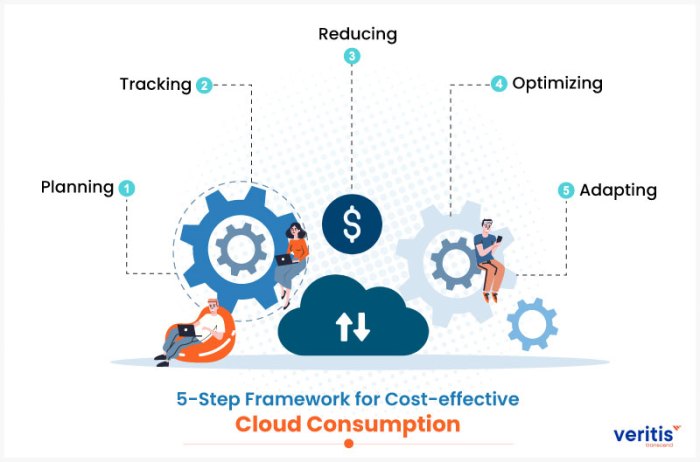
Optimizing cloud spending often starts with a thorough evaluation of your resource utilization. Right-sizing, the process of adjusting your cloud resources to precisely match your application’s needs, is a crucial step in controlling costs. This involves identifying and eliminating underutilized or oversized instances, leading to significant savings without compromising performance.
Right-sizing involves a systematic approach to analyzing your current resource allocation and adjusting it based on actual usage patterns. This isn’t a one-time task; it’s an ongoing process that requires regular monitoring and adjustment. By aligning your resource consumption with your actual demands, you can significantly reduce unnecessary expenses and improve efficiency.
Identifying Underutilized and Oversized Instances
Identifying underutilized or oversized instances requires a combination of monitoring tools and analytical techniques. Cloud providers offer detailed dashboards that track CPU utilization, memory usage, network traffic, and storage consumption. Analyzing this data over time reveals consistent underutilization, indicating opportunities for downsizing. Conversely, instances frequently exceeding their capacity limits suggest a need for upsizing. Tools like CloudWatch (AWS), Monitoring (Google Cloud), and Azure Monitor provide the necessary data visualization and alerting capabilities.
Right-Sizing Different Cloud Resources
Right-sizing applies to various cloud resources. For compute instances, analyze CPU and memory usage. If an instance consistently operates below 50% CPU utilization and memory usage, consider downsizing to a smaller instance type. For storage, review storage usage trends. Archive less frequently accessed data to cheaper storage tiers like Glacier (AWS) or Coldline (Google Cloud). For databases, optimize database design and query performance. Consider scaling down database instances during off-peak hours or using serverless database options to pay only for what you use.
Monitoring Resource Utilization and Automated Alerts
Continuous monitoring is essential for proactive cost management. Cloud providers’ monitoring services allow you to set custom thresholds for resource utilization. When these thresholds are exceeded or fallen below, automated alerts can be triggered, notifying you of potential overspending or underutilization. These alerts allow for timely adjustments, preventing prolonged periods of unnecessary expense or performance bottlenecks. For example, you could set an alert if CPU utilization consistently stays below 20% for a week, suggesting a potential for downsizing.
Cost Comparison of Different Instance Sizes
The following table illustrates the cost implications of different instance sizes for a typical web server workload. Note that these are estimated costs and can vary based on region, provider, and specific configurations.
| Instance Type | CPU | RAM | Estimated Monthly Cost (USD) |
|---|---|---|---|
| t2.micro | 1 vCPU | 1 GiB | $10 |
| t2.small | 1 vCPU | 2 GiB | $20 |
| t2.medium | 2 vCPU | 4 GiB | $40 |
| t2.large | 2 vCPU | 8 GiB | $80 |
Optimizing Cloud Storage

Cloud storage is a critical component of any cloud computing strategy, but its cost can quickly escalate if not managed effectively. Understanding the different storage options available and implementing efficient data management practices are crucial for controlling expenses and maximizing your return on investment. This section will explore strategies for optimizing your cloud storage costs.
Different cloud storage options cater to various needs and have different price structures. Choosing the right option for your data is essential for cost optimization.
Cloud Storage Options and Cost Implications
Cloud providers typically offer three main types of storage: object storage, block storage, and file storage. Object storage, ideal for unstructured data like images and videos, is often the most cost-effective option for large-scale storage. Block storage, best suited for structured data like databases and virtual machine disks, is usually priced per gigabyte and often involves higher costs per GB than object storage. File storage, designed for sharing and collaborating on files, sits somewhere in between, offering a balance of accessibility and cost. The cost differences stem from the underlying infrastructure, access methods, and management overhead associated with each type. For example, object storage often utilizes a distributed system that is more scalable and less expensive to operate compared to the more tightly coupled nature of block storage.
Storage Tiers and Cost-Effectiveness
Most cloud providers offer tiered storage options, differentiating storage based on access frequency. Frequently accessed data is typically stored in a higher-tier, faster storage class, incurring higher costs. Infrequently accessed data, such as backups or archival data, can be stored in lower-tier, cheaper storage classes. This tiered approach allows you to balance cost and performance. For example, Amazon S3 offers various storage classes like S3 Standard, S3 Intelligent-Tiering, S3 Standard-IA, and S3 Glacier, each with different price points and retrieval times. By strategically placing data in the appropriate tier, you can significantly reduce your overall storage costs without compromising access to critical information. A common strategy is to move less frequently accessed data to a lower-cost tier after a defined period, potentially saving a considerable amount of money over time.
Archiving and Deleting Unnecessary Data
Data that is no longer needed should be archived or deleted. Archiving moves data to a less expensive storage tier, preserving it for future access if necessary. Deletion permanently removes the data, freeing up storage space and eliminating associated costs. Regular data cleanup, guided by a retention policy, is crucial for preventing storage costs from spiraling out of control. Consider implementing automated processes to identify and manage data according to its age and relevance. For example, implementing a lifecycle policy in Amazon S3 automatically transitions data to cheaper storage classes after a specified period or deletes data after a certain time. This automated approach minimizes manual intervention and ensures consistent cost optimization.
Best Practices for Efficient Data Management
Efficient data management is key to controlling cloud storage costs. Implementing the following best practices can significantly reduce expenses:
- Regularly review and delete unnecessary files and data.
- Utilize lifecycle policies to automatically transition data to cheaper storage tiers.
- Employ data compression techniques to reduce storage space requirements.
- Implement data deduplication to eliminate redundant copies of data.
- Monitor storage usage regularly and identify areas for optimization.
- Consider using cloud-native tools for data management and analysis.
- Leverage serverless technologies to minimize infrastructure costs associated with data processing.
Leveraging Cloud Pricing Models and Discounts
Understanding and effectively utilizing cloud pricing models is crucial for optimizing your cloud spending. Different models cater to varying usage patterns and offer opportunities for significant cost savings. By carefully selecting the right model and taking advantage of available discounts, businesses can significantly reduce their cloud bills.
Cloud providers offer a variety of pricing models, each with its own advantages and disadvantages. Choosing the most appropriate model depends heavily on the nature and predictability of your workload. A poorly chosen model can lead to unexpectedly high costs, while a well-chosen one can dramatically reduce expenses.
Cloud Pricing Model Comparisons
Several key pricing models are commonly offered by major cloud providers. These include pay-as-you-go, reserved instances, and spot instances. Each offers a different balance between cost and flexibility.
Pay-as-you-go (PAYG): This is the most flexible model, charging you only for the resources you consume. It’s ideal for unpredictable workloads or projects with uncertain durations. However, it can be more expensive in the long run for consistently used resources.
Reserved Instances (RIs): RIs offer significant discounts in exchange for committing to a specific amount of compute capacity for a set period (e.g., one or three years). This is cost-effective for predictable, long-term workloads. However, you’re locked into that commitment, and unused capacity is still paid for.
Spot Instances: Spot instances provide access to spare compute capacity at significantly reduced prices. These are ideal for fault-tolerant, flexible workloads that can be interrupted with short notice. However, instances can be terminated with short notice (typically two minutes), requiring your applications to be designed for interruptions.
Leveraging Discounts and Promotions
Cloud providers frequently offer various discounts and promotions to incentivize usage and encourage long-term commitments. These can significantly reduce your overall costs. Examples include sustained use discounts (lower prices for consistently running instances), committed use discounts (similar to reserved instances but often with more flexible terms), and promotional credits for new users or specific services. Actively monitoring for these opportunities and adjusting your usage patterns accordingly can lead to substantial savings.
Cost Savings Potential Comparison
The following table illustrates the potential cost savings of different pricing models for a hypothetical workload requiring 100 compute hours per month over a year. These are illustrative examples and actual savings will vary depending on the specific provider, region, and instance type.
| Pricing Model | Hourly Rate | Monthly Cost | Annual Cost |
|---|---|---|---|
| Pay-as-you-go | $0.10 | $100 | $1200 |
| Reserved Instance (1-year) | $0.07 | $70 | $840 |
| Spot Instance (average) | $0.05 | $50 | $600 |
Conclusion

Efficient cloud cost management is an ongoing process, requiring continuous monitoring and adaptation. By consistently applying the strategies Artikeld – right-sizing resources, optimizing storage, and leveraging favorable pricing models – you can significantly reduce your cloud spending without sacrificing performance or functionality. Remember, proactive management and regular review are key to long-term cost optimization. Embrace these practices and unlock the true potential of cloud computing while maintaining fiscal responsibility.