Unlocking the power of data requires more than just crunching numbers; it demands strategic optimization. This guide delves into seven key techniques to transform raw data into actionable insights. We’ll explore efficient data cleaning, powerful exploratory analysis methods, and advanced techniques to uncover hidden patterns and drive informed decision-making. Prepare to elevate your data analysis skills and extract maximum value from your datasets.
From handling missing values and identifying outliers to mastering regression analysis and dimensionality reduction, we provide practical steps and illustrative examples to guide you through each stage. Whether you’re a seasoned analyst or just beginning your data journey, this comprehensive guide will equip you with the tools and knowledge to optimize your workflow and achieve significantly improved results.
Data Cleaning and Preparation Techniques
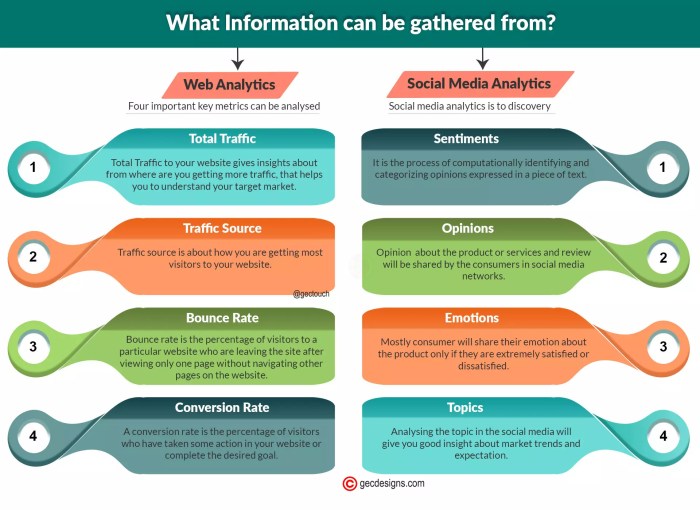
Data cleaning and preparation are crucial steps in any data analysis project. The quality of your insights is directly dependent on the quality of your data. Inaccurate, incomplete, or inconsistent data can lead to flawed conclusions and ultimately, poor decision-making. This section will explore essential techniques for ensuring your data is ready for analysis.
Handling Missing Values
Missing data is a common problem in datasets. Ignoring missing values can significantly bias your analysis. Effective strategies for handling missing data include deletion, imputation, and prediction, with the best approach depending on the nature of the data and the extent of missingness. A step-by-step guide follows, illustrated with a hypothetical dataset.
Let’s consider a dataset tracking student performance, with some missing grades:
| Student ID | Math | Science | English |
|---|---|---|---|
| 1 | 85 | 92 | 78 |
| 2 | 76 | 88 | |
| 3 | 90 | 85 | |
| 4 | 82 | 79 | 91 |
Step 1: Identify Missing Values. Visually inspect the dataset or use functions within your analysis software to locate missing values (often represented as NaN, NULL, or empty cells).
Step 2: Determine the Extent of Missingness. Assess the percentage of missing values for each variable. A high percentage might necessitate more sophisticated imputation or removal strategies.
Step 3: Choose an Imputation Method. For this example, we’ll use mean imputation for simplicity. For each column with missing values, calculate the mean of the existing values and replace the missing values with this mean.
Step 4: Impute Missing Values. The mean of the ‘English’ scores is (78 + 85 + 91)/3 = 84.67. The mean of ‘Science’ scores is (92 + 79)/2 = 85.5. We replace missing values with these means.
| Student ID | Math | Science | English |
|---|---|---|---|
| 1 | 85 | 92 | 78 |
| 2 | 76 | 88 | 84.67 |
| 3 | 90 | 85.5 | 85 |
| 4 | 82 | 79 | 91 |
Outlier Detection and Removal
Outliers are data points that significantly deviate from the rest of the data. They can skew analysis results and distort insights. Identifying and addressing outliers is essential for accurate analysis. Effective methods include box plots, scatter plots, and z-score calculations.
Consider a scenario where we’re analyzing house prices. A scatter plot of house size versus price might reveal a few houses with exceptionally high prices compared to their size. These could be outliers, potentially due to unique features or errors in the data. The visualization would show these points far removed from the main cluster of data points on the scatter plot. This visual inspection can be followed by quantitative methods to confirm their outlier status.
Data Transformation Techniques
Data transformation involves modifying the data’s scale or distribution to improve the analysis. Common methods include normalization and standardization.
Let’s say we have a dataset of exam scores with varying ranges:
| Student | Math (0-100) | Science (0-100) | English (0-50) |
|---|---|---|---|
| A | 90 | 85 | 40 |
| B | 75 | 92 | 35 |
| C | 80 | 78 | 45 |
To normalize the data to a 0-1 range, we apply the formula: (x - min) / (max - min), where x is the individual score, min is the minimum score in the column, and max is the maximum score. Standardization involves transforming the data to have a mean of 0 and a standard deviation of 1, using the z-score: (x - mean) / standard deviation.
After normalization:
| Student | Math (0-1) | Science (0-1) | English (0-1) |
|---|---|---|---|
| A | 0.9 | 0.8 | 0.8 |
| B | 0.75 | 1.0 | 0.4 |
| C | 0.8 | 0.6 | 1.0 |
Exploratory Data Analysis (EDA) Strategies

Exploratory Data Analysis (EDA) is a crucial initial step in any data analysis project. It involves summarizing the main characteristics of the data, identifying patterns, and formulating hypotheses before employing more formal modeling techniques. Effective EDA can significantly improve the efficiency and effectiveness of subsequent analyses, preventing costly errors and leading to more insightful conclusions.
Visualizing Data Distributions
Visualizations are paramount in EDA. They allow us to quickly grasp the underlying patterns and distributions within our data. Histograms provide a visual representation of the frequency distribution of a single numerical variable. For example, a histogram of customer ages might reveal a bimodal distribution, suggesting two distinct customer segments. Box plots, on the other hand, summarize the distribution of a numerical variable through its quartiles, median, and potential outliers. They effectively highlight the spread, central tendency, and presence of extreme values. Comparing box plots for different groups (e.g., customer age distribution across different product categories) can reveal significant differences. Other useful visualizations include kernel density estimates, which offer a smoother representation of the distribution than histograms, and violin plots, which combine aspects of box plots and kernel density estimates.
Identifying Correlations Between Variables
Scatter plots are excellent for visualizing the relationship between two numerical variables. For instance, plotting advertising spend against sales revenue might reveal a positive correlation, indicating that increased advertising leads to higher sales. However, correlation does not imply causation; other factors could be influencing both variables. Correlation matrices, which display the correlation coefficients between all pairs of numerical variables in a dataset, provide a more comprehensive overview of the relationships within the data. A correlation coefficient of +1 indicates a perfect positive correlation, -1 a perfect negative correlation, and 0 indicates no linear correlation. For example, a correlation matrix might show a strong positive correlation between age and income and a weak negative correlation between age and hours spent on social media.
EDA Workflow
A structured workflow is essential for efficient and effective EDA. The following steps provide a robust framework:
- Data Loading and Inspection: Begin by loading the dataset and examining its structure, including variable types, missing values, and overall size. This initial check helps identify potential issues early on.
- Data Cleaning: Address missing values and outliers. Decide on appropriate strategies for handling these issues, such as imputation or removal, based on the nature of the data and the potential impact on analysis.
- Univariate Analysis: Explore each variable individually using summary statistics (mean, median, standard deviation, etc.) and visualizations (histograms, box plots, etc.). This helps understand the distribution and characteristics of each variable.
- Bivariate and Multivariate Analysis: Investigate relationships between pairs of variables (scatter plots, correlation matrices) and among multiple variables (e.g., using heatmaps or pair plots). This identifies potential correlations and interactions.
- Hypothesis Generation: Based on the patterns observed during the analysis, formulate hypotheses to be tested in subsequent stages of the analysis. This is a crucial step in guiding further investigation.
Summary Statistics and Decision-Making
Summary statistics provide a concise numerical summary of the data’s key characteristics. The mean represents the average value, the median the middle value, and the standard deviation measures the spread or variability around the mean. For example, if the average customer satisfaction score is 7.8 out of 10, with a standard deviation of 1.2, it suggests that most customers are satisfied, but there’s considerable variation in satisfaction levels. A high standard deviation might prompt further investigation into factors contributing to this variation. Comparing the mean and median can reveal skewness in the data; a significantly higher mean than median suggests a right-skewed distribution, while the opposite indicates a left-skewed distribution. This information can inform decisions about the appropriate statistical methods to use in subsequent analyses and about the nature of the underlying population.
Advanced Data Analysis Methods

Moving beyond basic descriptive statistics and exploratory analysis, we now delve into more sophisticated techniques that unlock deeper insights from your data. These advanced methods allow for complex modeling, pattern identification, and ultimately, more informed decision-making. This section will cover several key approaches, highlighting their applications and limitations.
Regression Techniques
Regression analysis is a powerful statistical method used to model the relationship between a dependent variable and one or more independent variables. Understanding different regression types allows for a nuanced approach to modeling various relationships within data. We will examine three common techniques: Linear Regression, Logistic Regression, and Polynomial Regression.
Linear Regression models the relationship between variables assuming a linear relationship. The model aims to find the best-fitting straight line through the data points. This is suitable when the dependent variable is continuous and the relationship with the independent variables is approximately linear. For example, predicting house prices based on size and location could use linear regression. The equation is typically represented as: y = β0 + β1x1 + β2x2 + ... + βnxn + ε, where y is the dependent variable, x’s are the independent variables, β’s are the coefficients, and ε is the error term.
Logistic Regression, on the other hand, is used when the dependent variable is categorical (typically binary, such as 0 or 1). It models the probability of the dependent variable belonging to a particular category. A common application is predicting customer churn (whether a customer will cancel a service) based on factors like usage and demographics. The model outputs a probability score between 0 and 1, often interpreted as the likelihood of the event occurring.
Polynomial Regression extends linear regression by allowing for non-linear relationships between variables. It achieves this by adding polynomial terms (e.g., x², x³) to the linear equation. This is useful when a simple linear model doesn’t adequately capture the relationship in the data. For instance, modeling the relationship between fertilizer application and crop yield might benefit from a polynomial regression, as the yield might increase at a diminishing rate with increasing fertilizer.
| Regression Type | Strengths | Weaknesses | Applications |
|---|---|---|---|
| Linear Regression | Simple to interpret, computationally efficient | Assumes linearity, sensitive to outliers | Predicting house prices, sales forecasting |
| Logistic Regression | Predicts probabilities, useful for classification | Assumes independence of predictors, can be sensitive to class imbalance | Customer churn prediction, credit risk assessment |
| Polynomial Regression | Can model non-linear relationships | Prone to overfitting, can be difficult to interpret | Modeling complex relationships, curve fitting |
Clustering Algorithms
Clustering algorithms group similar data points together based on their characteristics. This is invaluable for identifying patterns, segments, and anomalies within a dataset. K-means clustering is a widely used algorithm that partitions data into k clusters, where k is a pre-defined number.
Let’s consider a scenario where we have customer data including age, income, and spending habits. We want to identify distinct customer segments for targeted marketing campaigns. The steps involved in applying a K-means clustering algorithm would be:
1. Data Preparation: Clean and preprocess the customer data, potentially scaling or normalizing the features (age, income, spending) to ensure they contribute equally to the distance calculations.
2. Choosing k: Decide on the number of clusters (k) based on domain knowledge or techniques like the elbow method (analyzing the within-cluster sum of squares).
3. Initialization: Randomly select k data points as initial centroids (cluster centers).
4. Assignment: Assign each data point to the nearest centroid based on a distance metric (e.g., Euclidean distance).
5. Update: Recalculate the centroids as the mean of all data points assigned to each cluster.
6. Iteration: Repeat steps 4 and 5 until the centroids no longer change significantly or a maximum number of iterations is reached.
7. Analysis: Analyze the resulting clusters to understand the characteristics of each segment (e.g., average age, income, spending habits) and use this information for targeted marketing.
Dimensionality Reduction Techniques
High-dimensional data can be challenging to analyze due to the “curse of dimensionality.” Dimensionality reduction techniques aim to reduce the number of variables while preserving important information. Principal Component Analysis (PCA) and t-distributed Stochastic Neighbor Embedding (t-SNE) are two popular methods.
PCA is a linear transformation that projects data onto a lower-dimensional subspace while maximizing variance. Imagine a dataset with two highly correlated variables (e.g., height and weight). PCA would identify a principal component that captures most of the variance in the data, effectively reducing the dimensionality from two to one. This new dimension represents a combination of the original variables.
t-SNE, on the other hand, is a non-linear technique that focuses on preserving local neighborhood structures in the data. It is particularly useful for visualizing high-dimensional data in two or three dimensions. Imagine a dataset representing different types of flowers, characterized by many features (petal length, petal width, sepal length, etc.). t-SNE could effectively map these flowers into a 2D space where similar flowers cluster together, allowing for easy visualization and identification of groups.
Data Visualization Tools
Effective data visualization is crucial for communicating complex analysis results. Various tools cater to different needs and data types. Tableau and Power BI are popular business intelligence tools offering interactive dashboards and visualizations. They excel at creating visually appealing reports for business users, but may lack the depth of customization offered by specialized statistical software. R and Python, along with libraries like ggplot2 and matplotlib, provide greater control over visualizations and are ideal for more complex analyses and custom visualizations. The choice of tool depends on the complexity of the analysis, the audience, and the desired level of customization.
Outcome Summary

By implementing these seven techniques—from meticulous data preparation to the application of advanced analytical methods—you can significantly enhance the accuracy, efficiency, and impact of your data analysis. Remember that effective data analysis is an iterative process; continuous refinement and exploration are key to uncovering valuable insights that inform strategic decisions and drive meaningful outcomes. Embrace these strategies to unlock the full potential of your data and transform it into a powerful asset for your endeavors.