Database query optimization is crucial for application speed and efficiency. Slow queries can lead to frustrating user experiences, impacting everything from website load times to application responsiveness. This guide delves into six key techniques to significantly improve your database query performance, covering everything from indexing strategies to advanced troubleshooting methods. We’ll explore practical examples and best practices applicable to various database systems, empowering you to build faster, more efficient applications.
We’ll examine common pitfalls in query writing, such as inefficient joins and poorly structured SELECT statements. We’ll then introduce solutions, including effective indexing techniques, query caching strategies, and the importance of database normalization. Furthermore, this guide will equip you with the knowledge to interpret query execution plans, utilize profiling tools, and implement advanced strategies like database partitioning for handling massive datasets.
Understanding Database Query Optimization
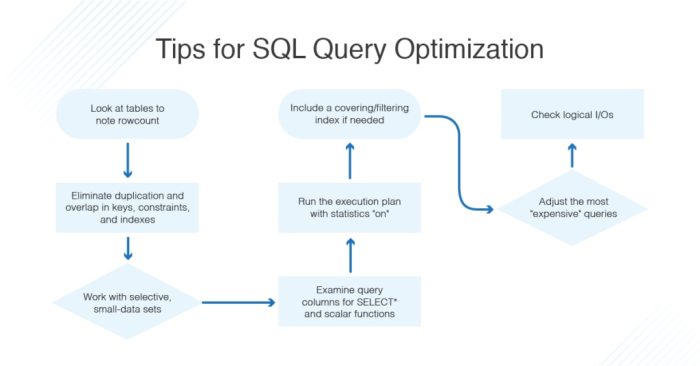
Efficient database queries are the cornerstone of high-performing applications. Slow queries directly translate to slow application response times, frustrated users, and potentially significant business losses. Optimizing your queries is crucial for ensuring scalability, maintainability, and a positive user experience.
Database query optimization involves analyzing and improving the performance of SQL queries to reduce execution time and resource consumption. This process encompasses various techniques, from improving query structure and indexing strategies to optimizing database server configurations. A well-optimized database can significantly improve the overall responsiveness and efficiency of your application.
Causes of Slow Database Queries
Several factors contribute to slow database query performance. These issues often stem from poorly written queries, inadequate indexing, or inefficient database design. Let’s explore some common culprits:
- Lack of Indexes: Without appropriate indexes, the database must perform a full table scan to locate the required data, which is incredibly inefficient for large tables. For example, searching for a specific user based on their ID would be significantly faster with an index on the `user_id` column.
- Inefficient Joins: Improperly constructed joins, particularly those involving large tables, can lead to a combinatorial explosion of data processed. Using the wrong join type (e.g., using a `CROSS JOIN` when an `INNER JOIN` is sufficient) can drastically increase query execution time.
- Poorly Written Queries: Queries containing unnecessary operations (e.g., redundant calculations, excessive `SELECT` columns), suboptimal filtering, or the use of functions within `WHERE` clauses (unless indexed) can significantly degrade performance. For instance, using `LIKE ‘%pattern%’` is generally slow compared to `LIKE ‘pattern%’`.
- Unnecessary Data Retrieval: Retrieving more data than needed adds to processing overhead. Selecting all columns (`SELECT *`) when only a few are required is a common inefficiency.
- Lack of Database Normalization: A poorly normalized database schema can lead to data redundancy and increased query complexity. This often results in slower queries and increased storage needs.
Database System Comparison
Different database systems (e.g., MySQL, PostgreSQL, Oracle, SQL Server) offer varying levels of query optimization capabilities. While the core principles remain the same, their internal query optimizers, indexing mechanisms, and available features differ. For instance, PostgreSQL’s advanced query planner often outperforms simpler systems in complex query scenarios. Oracle, known for its enterprise-grade features, offers sophisticated query optimization tools and features like materialized views for pre-computed results. The choice of database system should align with the specific needs and performance requirements of the application.
Illustrative Example: Poorly Written Queries and Performance Impact
Consider a simple database schema for a blog:
| Query | Execution Time (ms) | Number of Rows Returned | Notes |
|---|---|---|---|
SELECT * FROM posts WHERE title LIKE '%example%'; |
500 | 10 | Slow due to full table scan. |
SELECT post_id, title, content FROM posts WHERE title LIKE 'example%'; |
20 | 10 | Faster; only retrieves necessary columns. |
SELECT post_id, title, content FROM posts WHERE title LIKE '%example%' AND published = TRUE; |
100 | 5 | Slightly faster with added filtering but still slow due to the leading wildcard. |
SELECT post_id, title, content FROM posts WHERE published = TRUE AND title LIKE 'example%'; |
10 | 5 | Fastest; optimized filtering and column selection. |
Implementing Six Key Optimization Techniques
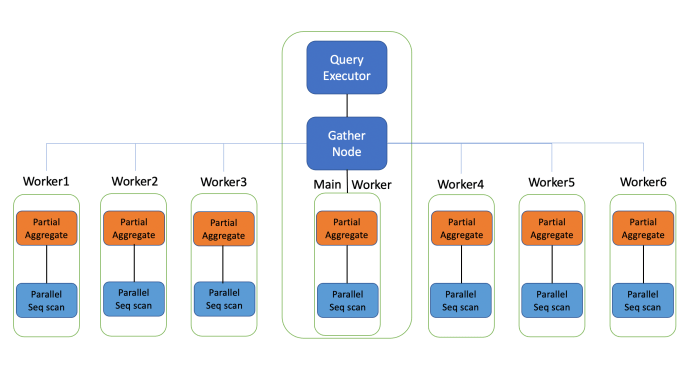
Database query optimization is crucial for application performance and scalability. Slow queries can lead to frustrated users and increased server load. This section details six key techniques to significantly improve your database query speed.
Effective Index Implementation
Indexes are data structures that dramatically speed up data retrieval. They work similarly to an index in a book, allowing the database to quickly locate specific rows without scanning the entire table. Different index types cater to various query patterns.
- B-tree indexes: The most common type, ideal for equality and range searches (e.g.,
WHERE age > 25orWHERE city = 'London'). They are efficient for both searching and sorting. - Hash indexes: Optimized for equality searches (e.g.,
WHERE id = 123). They are faster than B-tree indexes for exact matches but don’t support range queries. - Full-text indexes: Specifically designed for searching text data, allowing for efficient matching and ranking (e.g., searching for articles containing “database optimization”).
- Composite indexes: Indexes on multiple columns, improving performance when queries filter on combinations of columns (e.g., an index on (city, age) would be efficient for
WHERE city = 'London' AND age > 25).
Choosing the right index type depends on the most frequent queries against your table. Over-indexing can hurt performance, so careful consideration is necessary. For example, a poorly chosen composite index might not be utilized if only a subset of the indexed columns are used in a query.
Efficient SQL Query Writing
Well-structured SQL queries are fundamental to performance. Careful consideration of SELECT statements and JOIN operations is paramount.
- Minimize data retrieval: Only select the columns necessary. Avoid using
SELECT *, which retrieves all columns, even if only a few are needed. - Optimize JOINs: Use appropriate
JOINtypes (INNER JOIN,LEFT JOIN,RIGHT JOIN) and ensure efficient join conditions. AvoidCROSS JOINunless absolutely necessary, as it generates a Cartesian product of the tables. - Use appropriate data types: Choosing the correct data types reduces storage space and improves query performance. For example, using
INTinstead ofVARCHARfor numerical IDs is generally more efficient. - Avoid functions in WHERE clauses: Applying functions to columns in the
WHEREclause can prevent index usage. For example,WHERE UPPER(name) = 'JOHN'might be slower thanWHERE name = 'John'if there’s an index on thenamecolumn.
For example, instead of SELECT * FROM users WHERE UPPER(email) LIKE '%@example.com%', consider creating a full-text index on the email column for faster searches.
Query Caching Implementation (MySQL Example)
Query caching stores the results of frequently executed queries, reducing database load and improving response times. MySQL’s query cache (deprecated in MySQL 8.0) was a simple form of caching. Modern alternatives include using a dedicated caching layer (like Redis or Memcached) or leveraging database features like materialized views.
In MySQL 8.0 and later versions, consider using the performance schema and slow query log to identify frequently executed queries. These queries can then be optimized or cached using a separate caching layer. For example, a popular user profile page could be cached to significantly reduce database load during peak hours.
Database Normalization Impact
Database normalization reduces data redundancy and improves data integrity. Different normalization forms (1NF, 2NF, 3NF, BCNF) offer varying levels of normalization.
- Advantages: Reduced data redundancy, improved data integrity, easier data modification, improved query performance (in many cases).
- Disadvantages: Increased storage space (sometimes), more complex query structures (potentially).
The optimal normalization level depends on the specific application and data characteristics. Over-normalization can lead to performance overhead due to increased join operations.
Optimizing Large Datasets
Handling large datasets requires specialized techniques to maintain performance.
- Partitioning: Dividing a large table into smaller, manageable partitions improves query performance by reducing the amount of data scanned. Partitions can be based on various criteria, such as date, region, or customer ID.
- Data Warehousing: For analytical queries on large datasets, a data warehouse is beneficial. It stores historical data in a structured format optimized for reporting and analysis, often using techniques like star schemas or snowflake schemas.
For example, a large e-commerce database might partition its order table by year or month to improve query performance on specific time periods.
Query Optimization Tool Comparison
Several tools assist in database query optimization.
| Tool | Features |
|---|---|
| Explain Plan (most DBMS) | Provides detailed execution plans, showing how the database will execute a query, revealing potential bottlenecks. |
| Database Profilers (e.g., MySQL Workbench Profiler) | Monitor query performance, identify slow queries, and provide insights into resource usage. |
| Query Analyzers (various commercial and open-source tools) | Advanced analysis capabilities, including automatic query rewriting and performance recommendations. |
Choosing the right tool depends on the database system and the complexity of the optimization tasks. Using a combination of tools often provides the most comprehensive analysis.
Advanced Optimization Strategies and Troubleshooting
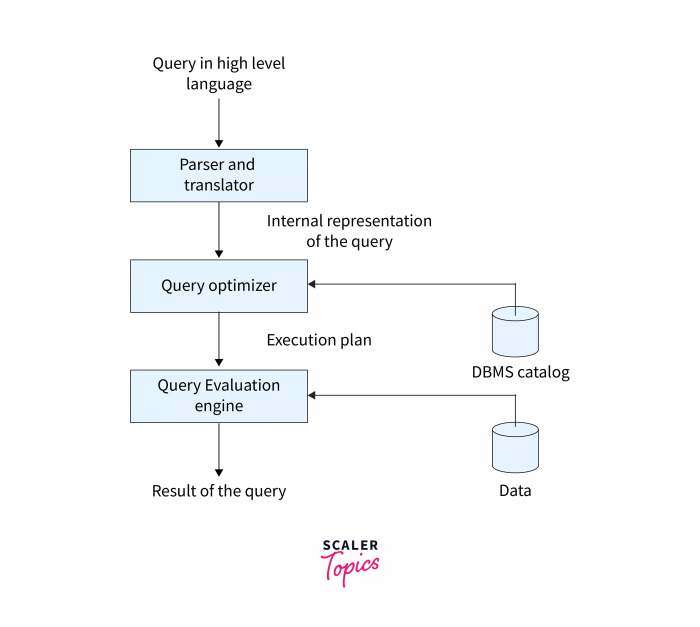
Database query optimization extends beyond basic techniques. Advanced strategies involve a deeper understanding of query execution and the ability to effectively utilize database tools and features. This section explores techniques for diagnosing performance bottlenecks, leveraging advanced features, and proactively maintaining database health.
Query Execution Plans and Bottleneck Identification
Understanding how the database processes a query is crucial for optimization. Query execution plans (QEPs) visually represent the steps the database takes to execute a query. These plans detail the algorithms used (e.g., index scans, full table scans), the order of operations, and the estimated cost of each step. Databases like PostgreSQL, MySQL, and SQL Server provide tools to view QEPs. By analyzing the QEP, developers can identify performance bottlenecks, such as missing indexes, inefficient joins, or poorly written queries. For instance, a QEP showing a full table scan on a large table instead of an index scan indicates a significant performance problem that can be solved by creating an appropriate index. Examining the estimated cost associated with each operation allows for a quantitative assessment of the query’s efficiency. A high cost usually points towards an area that needs optimization.
Profiling Tools for Slow Query Detection
Database systems offer built-in profiling tools to identify slow-running queries. These tools monitor query execution times and provide detailed information about resource consumption. For example, MySQL’s `slow_query_log` records queries exceeding a specified execution time, allowing developers to pinpoint and address performance issues proactively. Similar functionality is available in other database systems, often through performance monitoring dashboards or dedicated profiling utilities. Analyzing the results from these tools helps prioritize optimization efforts, focusing on queries that consume the most resources or consistently run slowly. This data-driven approach ensures that optimization efforts are focused on the queries that will yield the greatest performance improvements.
Stored Procedures and Views for Performance Enhancement
Stored procedures and views offer significant advantages for query performance and maintainability. Stored procedures are pre-compiled SQL code blocks stored within the database. Because they are pre-compiled, repeated execution is faster than executing the equivalent ad-hoc query. They also offer improved security and maintainability, as changes to the underlying database structure do not necessarily require changes to the application code that uses them. Views, on the other hand, are virtual tables based on the result-set of an SQL statement. They simplify complex queries, improving readability and maintainability. Well-designed views can also improve performance by pre-processing data or optimizing access patterns. For example, a view that joins frequently accessed tables can improve performance by reducing the need for repeated joins in application queries.
Handling and Resolving Common Database Performance Issues
A proactive approach to database management is essential. Regular monitoring and a well-defined strategy for handling performance issues are crucial for maintaining optimal database performance.
| Problem | Solution |
|---|---|
| Slow query execution | Analyze query execution plans, optimize queries, add indexes, or rewrite queries. |
| High resource consumption (CPU, memory, I/O) | Identify resource-intensive queries using profiling tools, optimize queries, add more resources (hardware), or optimize database configuration. |
| Deadlocks | Analyze database logs to identify deadlock situations, adjust transaction isolation levels, and optimize concurrency control. |
| Lack of indexes | Identify frequently queried columns and create appropriate indexes. |
| Inefficient table design | Normalize tables, remove redundant data, and optimize data types. |
Database Performance Monitoring and Improvement
Continuous monitoring is key to identifying and addressing performance issues before they impact users. Database management systems (DBMS) typically provide monitoring tools and metrics, such as query execution times, resource utilization, and transaction rates. These tools allow for the identification of trends and anomalies. Regularly reviewing these metrics enables proactive identification of potential performance bottlenecks. Setting up alerts for critical thresholds, such as high CPU utilization or slow query counts, allows for immediate intervention and prevents performance degradation. This proactive approach helps maintain optimal database performance and minimizes the impact of unexpected issues.
Last Word

By mastering the techniques Artikeld in this guide, you’ll be well-equipped to tackle database performance bottlenecks head-on. From understanding the fundamentals of query optimization to implementing advanced strategies, this comprehensive approach ensures that your applications remain responsive and efficient. Remember that continuous monitoring and proactive optimization are key to maintaining peak database performance. Regularly review your query execution plans, utilize profiling tools, and stay updated on the latest optimization techniques to ensure your database remains a well-oiled machine.