Producing music can feel like navigating a chaotic soundscape. However, a streamlined workflow can transform the process from overwhelming to efficient and enjoyable. This guide unveils seven key strategies to optimize your music production, turning potential frustration into creative flow and maximizing your time spent on the music itself.
From meticulous pre-production planning to mastering efficient mixing techniques, we’ll explore practical tips and tools to enhance your overall productivity. We’ll delve into optimizing your DAW, organizing your files, and collaborating effectively, all while focusing on achieving a polished final product in less time. Get ready to unlock your full creative potential.
Planning and Preparation
Efficient music production hinges on meticulous planning and preparation. A well-structured approach minimizes wasted time and maximizes creative output, leading to a smoother workflow and a higher-quality final product. Taking the time upfront to define your goals and organize your resources will pay dividends throughout the entire process.
Thorough planning ensures you’re not caught off guard by unexpected technical issues or creative roadblocks. It allows for a more focused and deliberate approach, ultimately saving you time and frustration in the long run. This proactive strategy facilitates a more efficient and enjoyable production experience.
Project Timeline
A clear project timeline is crucial for managing expectations and maintaining momentum. The following table provides a sample timeline; adjust it to suit the complexity of your project.
| Task | Timeline | Resources | Dependencies |
|---|---|---|---|
| Pre-Production (Concept, Sound Design, Arrangement) | 1-2 weeks | DAW, Instruments, Samples, Reference Tracks | None |
| Recording (Tracking Vocals, Instruments) | 1-3 weeks | Microphones, Audio Interface, Instruments, Recording Space | Completed Pre-Production |
| Mixing | 2-4 weeks | DAW, Plugins (EQ, Compression, Reverb, etc.), Monitors | Completed Recording |
| Mastering | 1-2 weeks | Mastering Software, Mastering Engineer (optional) | Completed Mix |
Pre-Production Checklist
A comprehensive pre-production checklist ensures you’re prepared for every stage of the recording process. This minimizes disruptions and keeps the creative flow consistent.
- Define Project Goals and Objectives: Clearly articulate the desired sound, genre, and target audience.
- Gather and Prepare Gear: Ensure all microphones, instruments, audio interfaces, and cables are functioning correctly and readily available.
- Sound Design: Develop a detailed sonic palette, including instrument choices, effects, and overall tonal direction. This might include creating sample libraries or designing custom sounds.
- Session Setup: Create a well-organized session template in your DAW, including track assignments, routing, and initial plugin settings.
- Create a Detailed Arrangement: Develop a complete arrangement including instrumentation, tempo, key, and song structure. This could involve sketching out MIDI parts or creating a detailed chart.
- Reference Tracks: Gather reference tracks that embody the desired sound and production quality.
- Prepare Your Workspace: Ensure your recording environment is acoustically treated and free from distractions.
Defining Clear Goals and Objectives
Before you begin any music production project, it’s crucial to define clear goals and objectives. This provides a roadmap for the entire process, ensuring that you stay focused and on track. Without clear objectives, the project can easily become disjointed and lack cohesion.
For example, if your goal is to create a polished pop song for radio play, your objectives might include achieving a specific tempo and key, using certain instruments, and adhering to a particular mixing style. This clarity prevents unnecessary experimentation and keeps the project aligned with its intended purpose. Consider the genre, target audience, and desired overall aesthetic when defining your objectives. This ensures the final product effectively communicates your artistic vision.
Streamlining Your Workflow
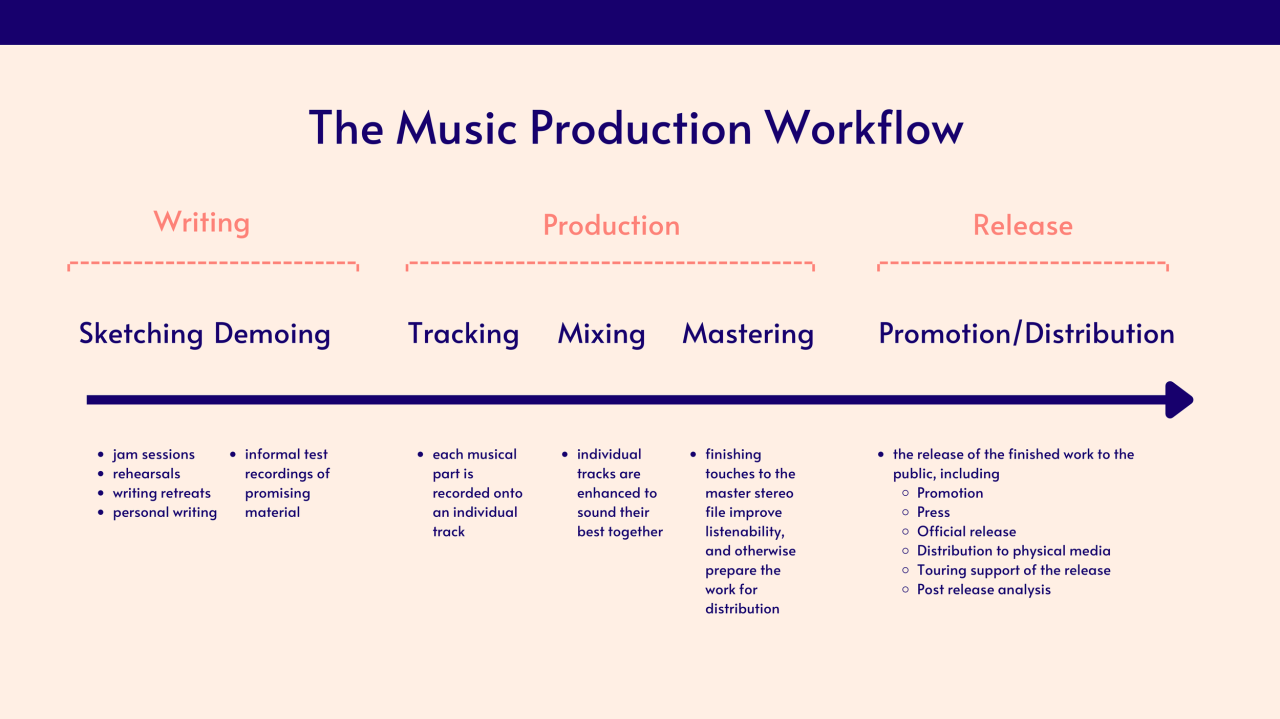
Optimizing your music production workflow isn’t just about making music faster; it’s about making better music more efficiently. A streamlined workflow allows you to focus on creativity rather than getting bogged down in technicalities. This section explores practical tools and techniques to achieve this.
Choosing the right Digital Audio Workstation (DAW) and organizing your files effectively are key components of a productive workflow. Efficient file management prevents wasted time searching for assets and reduces the risk of project corruption. A well-defined workflow for recording, editing, and mixing ensures a consistent and timely approach to each stage of production.
DAW Interface Comparison and Workflow Efficiency
Different DAWs offer varying interfaces, impacting workflow efficiency. Ableton Live, known for its session view, excels in live performance and loop-based composition, offering a highly visual and intuitive workflow ideal for electronic music producers. Its arrangement view allows for more traditional linear arrangement. In contrast, Logic Pro X, with its extensive array of features and highly customizable interface, caters to a broader range of genres and production styles, but its learning curve can be steeper, potentially slowing down beginners. Pro Tools, a professional industry standard, offers unparalleled power and stability but requires a significant investment in both time and resources to master its intricate functionality. The choice ultimately depends on individual preferences, project needs, and prior experience. A producer focusing on electronic music might find Ableton’s session view highly efficient, while a film composer might prefer Logic Pro X’s extensive orchestral tools and scoring capabilities.
Best Practices for Organizing Audio Files and Project Folders
Maintaining a clean and organized project structure is crucial for efficient workflow. A poorly organized project can quickly become overwhelming, leading to lost files and wasted time searching. A consistent file naming convention, using descriptive names and version numbers (e.g., “Track_01_v2.wav”), helps avoid confusion. Folders should be organized hierarchically, reflecting the project’s structure.
Here’s an example of a hierarchical file structure:
Project_Name/

├── Audio/

│   ├── Drums/

│   │   ├── Kick/

│   │   ├── Snare/

│   │   └── Hi-Hat/

│   ├── Bass/

│   ├── Guitars/

│   └── Vocals/

├── MIDI/

├── Samples/

└── Projects/
This structure ensures easy location of specific files and aids in collaboration if necessary. Using descriptive folder names, like “Drums,” “Bass,” and “Vocals,” improves organization and navigation. This approach, combined with a consistent naming convention, significantly reduces the time spent searching for specific audio files.
Workflow Diagram for Song Production
The following diagram Artikels a typical workflow for recording, editing, and mixing a song. Potential time-saving strategies are highlighted at each stage.
[Diagram description: The diagram would visually represent the following workflow. It would be a flowchart-style diagram with boxes representing stages and arrows indicating the flow. The boxes would be:
1. Pre-Production: (Time saving: Detailed planning and preparation as discussed in the previous section)
2. Recording: (Time saving: Efficient mic placement, clear communication with performers, well-prepared session templates)
3. Editing: (Time saving: Use of automation and keyboard shortcuts, efficient editing techniques, well-organized audio files)
4. Mixing: (Time saving: Use of reference tracks, well-defined mixing plan, efficient use of plugins and automation)
5. Mastering: (Time saving: Collaboration with a mastering engineer, clear communication regarding artistic vision)]
This structured approach minimizes backtracking and maximizes efficiency. For instance, using prepared session templates in step 2 eliminates the need to set up each track from scratch for every song, significantly reducing setup time. Similarly, a detailed mixing plan in step 4 prevents wasted time experimenting with different settings without direction.
Mastering the Mix
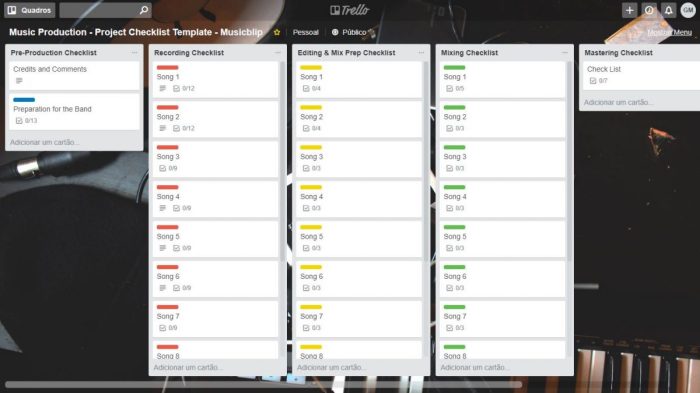
Efficient mixing and mastering are crucial for achieving a professional-sounding final product. This section details techniques to streamline these processes, saving you time and enhancing your sound. We’ll cover efficient plugin use, collaborative strategies, and a step-by-step mastering guide.
Effective mixing hinges on organization and a strategic approach to processing. Avoid the trap of endlessly tweaking; instead, focus on achieving a balanced and clear mix early on. This approach minimizes the need for extensive corrective measures later in the mastering stage.
Efficient Mixing Techniques
Efficient mixing relies on strategic plugin usage and automation. Overloading your tracks with countless plugins can lead to CPU strain and muddied sound. Instead, choose high-quality, versatile plugins and use them judiciously. For example, a well-designed EQ like FabFilter Pro-Q 3 can handle most equalization tasks, while a compressor like Waves CLA-76 can add punch and glue to your drums. Automation can be a powerful tool for dynamic mixing, allowing you to subtly shape the sound over time. For instance, automating a subtle gain reduction on a vocal track during a particularly loud section can prevent clipping and maintain clarity.
Collaborative Mixing and Mastering
Successful collaboration requires clear communication and a shared understanding of the artistic vision. Before starting, define roles and responsibilities. Establish a consistent workflow and file-sharing system, using platforms like Dropbox or Google Drive. Regular check-ins and constructive feedback sessions are vital. For example, having the mixing engineer send regular updates to the artist and address concerns promptly keeps everyone on the same page. Consider using a cloud-based collaborative DAW like Studio One or Logic Pro X, which allows multiple users to work on the same project simultaneously.
Mastering Workflow
A well-defined mastering workflow ensures a consistent and high-quality final product. The following steps provide a framework for achieving a polished master:
Effective mastering requires careful attention to detail and a good understanding of the sonic characteristics of your chosen format. It’s not simply about making the track louder; it’s about optimizing its overall sound for the intended playback environment.
- Gain Staging: Ensure that your mix is appropriately leveled before importing it into your mastering software. Avoid clipping at any stage.
- EQ: Use subtle EQ to address any frequency imbalances, focusing on the overall tonal balance rather than individual tracks.
- Compression: Apply gentle compression to control dynamics and add glue. Aim for a natural sound rather than excessive squishing.
- Stereo Widening/Imaging: Carefully widen the stereo field to enhance the mix’s spaciousness. Avoid excessive widening, which can lead to phase issues.
- Limiting: Use a limiter as the final stage to maximize loudness while maintaining dynamic range and avoiding distortion. Aim for a target loudness level that is suitable for the intended platform (e.g., streaming services).
- Dithering: Apply dithering before exporting to reduce quantization noise and ensure a clean final product.
- Export: Export your master in the appropriate format (e.g., WAV, MP3) with the correct bit depth and sample rate.
Epilogue
By implementing these seven tips, you can significantly enhance your music production workflow. From strategic planning and efficient use of your DAW to mastering effective mixing and collaboration techniques, the path to a more streamlined and productive process is clear. Remember, the goal isn’t just to finish projects, but to enjoy the journey and produce the best possible music. Embrace these strategies, and watch your creative output flourish.