Cloud storage offers unparalleled convenience, but unchecked growth can lead to surprisingly high bills. Understanding how to optimize your cloud storage is crucial for maintaining efficiency and controlling expenses. This guide explores nine practical strategies to significantly reduce your cloud storage costs, from identifying and eliminating unnecessary data to leveraging advanced features offered by major cloud providers. We’ll delve into data lifecycle management, explore various archiving techniques, and highlight tools that help you pinpoint and manage unused resources. By the end, you’ll be equipped to make informed decisions to minimize your cloud storage spending without sacrificing functionality.
This guide provides a comprehensive overview of cost-saving strategies, offering actionable steps and comparisons between different cloud services and their pricing models. We’ll also cover best practices for data compression, archiving, and leveraging cloud-specific features to streamline your storage and minimize expenses. Whether you’re a small business or a large enterprise, the principles discussed here apply equally, offering a pathway to more efficient and cost-effective cloud storage management.
Identifying Unnecessary Data & Storage Bloat
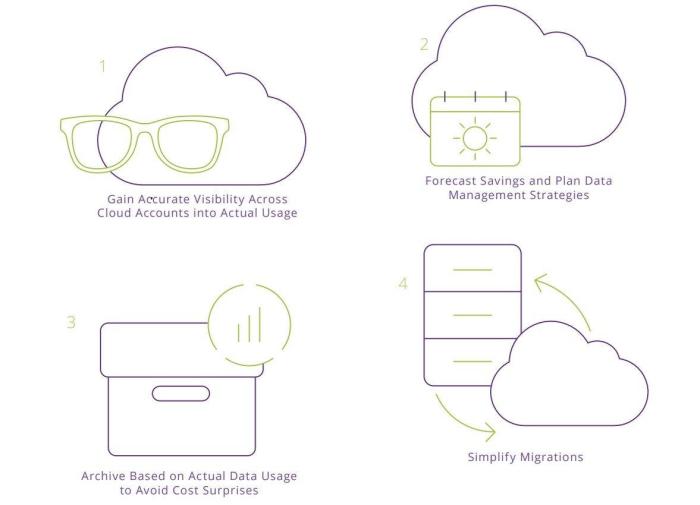
Unnecessary data and storage bloat are significant contributors to escalating cloud storage costs. Identifying and eliminating this excess data is crucial for optimizing your cloud spending. This involves understanding your data usage patterns, identifying redundant or obsolete files, and implementing strategies for automated data management. Let’s explore practical methods to achieve this.
Cloud Storage Tier Comparison
Choosing the right cloud storage tier is paramount for cost optimization. Different tiers offer varying levels of performance, features, and cost per gigabyte. Understanding these differences is key to making informed decisions and minimizing expenses. The following table provides a comparison of common storage tiers offered by major cloud providers (Note: Pricing is approximate and subject to change based on provider, region, and volume discounts).
| Storage Type | Price (USD/GB/Month – Approximate) | Features | Typical Use Cases |
|---|---|---|---|
| Standard Storage | $0.02 – $0.03 | High availability, frequent access | Active data, frequently accessed applications |
| Nearline Storage | $0.01 – $0.015 | Lower cost, infrequent access (retrieval fees may apply) | Data backups, archival data accessed less than once a month |
| Coldline Storage | $0.005 – $0.01 | Lowest cost, very infrequent access (high retrieval fees) | Long-term archiving, rarely accessed data |
| Archive Storage | $0.001 – $0.005 | Lowest cost, extremely infrequent access (very high retrieval fees) | Data archiving for compliance, disaster recovery |
Identifying and Deleting Obsolete Files and Folders
A systematic approach is essential for effectively identifying and removing unnecessary data. This involves a process of discovery, evaluation, and deletion. The following flowchart illustrates this process.
Flowchart: Identifying and Deleting Obsolete Files and Folders
Step 1: Inventory Your Data. Begin by creating a comprehensive inventory of your cloud storage, categorizing data by type, age, and access frequency. Tools provided by cloud providers can assist in this process. This will give you a clear picture of what you’re storing.
Step 2: Analyze Data Usage. Examine access logs and usage patterns to determine which data is frequently accessed and which remains untouched. Data that hasn’t been accessed for an extended period is a prime candidate for deletion or archiving. This analysis can be done through cloud provider tools or custom scripts.
Step 3: Identify Obsolete Data. Based on your analysis, identify data that is no longer needed, redundant, or outdated. This may include old versions of files, unused applications, or temporary files. This requires careful review to ensure you don’t accidentally delete critical data.
Step 4: Delete or Archive. Once obsolete data is identified, delete it permanently or archive it to a lower-cost storage tier. Remember to back up any data before deleting it permanently, as a precaution. Consider automated workflows for large-scale data removal.
Step 5: Review and Repeat. Regularly review your storage usage and repeat this process to prevent future storage bloat. Establishing a regular schedule for this task is essential for long-term cost optimization.
Implementing Data Lifecycle Management Policies
Data lifecycle management (DLM) policies automate the process of managing data based on predefined rules. These policies can automatically delete or archive data after a specified retention period, significantly reducing manual effort and storage costs. For instance, a company might set a policy to automatically delete temporary files after 30 days, or archive log files after one year, moving them to a less expensive storage tier. Implementing DLM policies requires careful planning and consideration of regulatory compliance requirements. Many cloud providers offer built-in DLM features that simplify this process. Effective DLM policies are crucial for long-term cost management and compliance.
Optimizing Data Storage & Archiving Techniques

Effective data storage and archiving are crucial for minimizing cloud storage costs. By strategically choosing storage services and employing data optimization techniques, organizations can significantly reduce their expenditure while maintaining data accessibility and security. This section explores various approaches to achieve this.
Cloud Storage Service Comparison
Selecting the right cloud storage service is paramount for cost optimization. Different providers offer varying pricing models and features that cater to different needs and budgets. A key factor to consider is the balance between cost, performance, and scalability. For example, Amazon S3 offers a tiered storage system with varying pricing based on access frequency and data durability requirements, allowing users to tailor their storage costs to their specific usage patterns. Azure Blob Storage offers similar tiered storage options, while Google Cloud Storage provides a range of storage classes with different pricing and performance characteristics. Each service also offers features like lifecycle management policies that automate the movement of data between storage tiers based on age or access patterns, further reducing costs.
| Feature | Amazon S3 | Azure Blob Storage | Google Cloud Storage |
|---|---|---|---|
| Pricing Model | Tiered storage based on access frequency and data durability | Tiered storage based on access frequency and data durability | Tiered storage based on access frequency and data durability |
| Data Compression Support | Yes, through client-side compression or server-side encryption | Yes, through client-side compression or server-side encryption | Yes, through client-side compression or server-side encryption |
| Lifecycle Management | Yes, automated data movement between storage tiers | Yes, automated data movement between storage tiers | Yes, automated data movement between storage tiers |
| Security Features | Encryption at rest and in transit, access control lists | Encryption at rest and in transit, access control lists | Encryption at rest and in transit, access control lists |
Data Compression Best Practices
Compressing data before uploading it to the cloud significantly reduces storage space and, consequently, storage costs. Various compression algorithms exist, each with its own trade-offs between compression ratio and processing time. Lossless compression, such as gzip or zip, is suitable for data where preserving the original information is critical. Lossy compression, such as JPEG or MP3, can achieve higher compression ratios but results in some data loss. The choice depends on the type of data and the acceptable level of data loss. Furthermore, using client-side compression allows for efficient compression before uploading, reducing the workload on the cloud provider’s servers.
Cloud-Based vs. On-Premise Archiving
The decision of whether to use cloud-based or on-premise archiving depends on factors like cost, accessibility, security requirements, and data volume. Cloud-based archiving offers scalability and cost-effectiveness for large data volumes, while on-premise solutions provide greater control over data security and compliance.
| Feature | Cloud-Based Archiving | On-Premise Archiving |
|---|---|---|
| Cost | Typically lower for large data volumes, pay-as-you-go model | Higher upfront investment in hardware and infrastructure, ongoing maintenance costs |
| Accessibility | High accessibility from anywhere with an internet connection | Limited accessibility, dependent on network infrastructure and physical location |
| Security | Relies on the cloud provider’s security measures, potential compliance concerns | Greater control over security measures, but requires robust internal security infrastructure |
Leveraging Cloud Features for Cost Savings

Cloud storage providers offer a wealth of features designed to help you optimize your spending. By understanding and effectively utilizing these features, you can significantly reduce your cloud storage costs without compromising data accessibility or business operations. This involves proactively managing your data lifecycle and leveraging the provider’s built-in cost-control mechanisms.
Effective cost management relies on understanding your data’s lifecycle and access patterns. This allows you to apply appropriate storage classes and lifecycle policies, optimizing costs based on data frequency of access and importance. By intelligently utilizing versioning and lifecycle policies, you can minimize storage consumption and ensure compliance with data retention requirements.
Versioning and Lifecycle Policies for Cost Control
Versioning, a feature offered by most cloud providers, automatically saves previous versions of your files. While offering a crucial safety net for data recovery, it can also lead to increased storage costs if not managed properly. Lifecycle policies, on the other hand, automate the movement of data between storage classes based on predefined rules, such as age or access frequency. For example, a lifecycle policy could automatically archive infrequently accessed data to a cheaper storage tier after a specified period, reducing overall storage costs. This ensures that frequently accessed data remains readily available in faster, more expensive storage tiers, while less frequently used data is moved to cost-effective archive storage. Implementing these policies requires careful consideration of your data usage patterns and business requirements. For instance, a company might set a policy to move data older than 6 months to a cheaper archive storage tier, knowing that access to such old data is infrequent.
Cloud Provider Tools for Unused Storage Management
Several cloud provider tools are designed to help you identify and manage unused storage resources. These tools often provide detailed reports on storage usage, identifying files or objects that haven’t been accessed for extended periods. This information allows for informed decisions about data archiving or deletion, leading to significant cost reductions. For example, AWS offers Storage Lens, a centralized view of your storage usage across multiple accounts and regions. Azure provides Storage Analytics, allowing you to track storage usage metrics and identify potential cost optimization opportunities. Google Cloud Platform offers similar tools within its Cloud Storage console, enabling detailed analysis of storage usage patterns. These tools provide valuable insights into your storage consumption and empower proactive cost management strategies.
Configuring Storage Classes and Tiers
Cloud providers typically offer different storage classes or tiers, each with varying pricing structures based on access speed, durability, and retrieval costs. Understanding these tiers is crucial for optimizing costs. Frequently accessed data should reside in faster, more expensive storage classes like “Standard” or “Hot” storage, while infrequently accessed data can be moved to cheaper options like “Coldline,” “Archive,” or “Glacier” storage. The cost savings from using cheaper tiers can be substantial, especially for large datasets. For instance, storing large archival datasets in a “Coldline” tier can significantly reduce storage costs compared to keeping them in a “Standard” tier. Properly configuring storage classes requires a careful assessment of data access patterns and business requirements to ensure both cost-effectiveness and data availability.
Conclusion
Effectively managing cloud storage costs requires a proactive and multi-faceted approach. By implementing the strategies Artikeld in this guide—from identifying and deleting unnecessary data to leveraging advanced features like lifecycle policies and tiered storage—you can significantly reduce expenses without compromising data accessibility or security. Regularly reviewing your storage usage, employing data compression techniques, and selecting the most appropriate storage tiers are all key to long-term cost optimization. Remember, a well-planned and consistently monitored cloud storage strategy is an investment in both efficiency and fiscal responsibility.